How to Export True HDR Photos for HDR Displays (2026 Guide)
You merged the brackets, nailed the tone mapping, and the image looks stunning — but the file you exported is still a regular SDR photo. If you want that image to actually display in HDR on a capable screen, the export format matters as much as the merge. Here’s how true HDR delivery works and how to do it from Luminance HDR.
HDR Photo vs HDR Display: Don’t Confuse Them
Two different things share the HDR name, and mixing them up causes most of the confusion:
- HDR photography is a capture technique — merging bracketed exposures so one image holds more dynamic range. (New here? Read what HDR photography is.)
- HDR display is a screen technology — HDR10, Dolby Vision, and HLG describe how bright highlights and wide color get shown on a capable monitor or TV.
A tone-mapped JPEG from any HDR software is still an SDR file: the extra dynamic range was compressed to fit a normal screen. True HDR delivery skips that compression — it stores the wide range and lets the HDR display show it.
Export Formats Compared
| Format | True HDR? | Compatibility | Best used for |
|---|---|---|---|
| JPEG (8-bit) | No — SDR only | Universal | Web, social media, clients who just need a viewable file |
| AVIF (10-bit, PQ/HLG) | Yes | Growing — modern browsers and phones | Web delivery of true HDR images |
| JPEG XL (up to 32-bit float) | Yes | Still limited | Archival and future-proof HDR delivery |
| TIFF (16-bit) | Yes, with HDR metadata | Wide in photo software | Master files, print workflows |
| OpenEXR / Radiance RGBE | Yes — full 32-bit scene data | VFX and 3D pipelines | Archival masters, CGI and compositing work |
Exporting True HDR from Luminance HDR
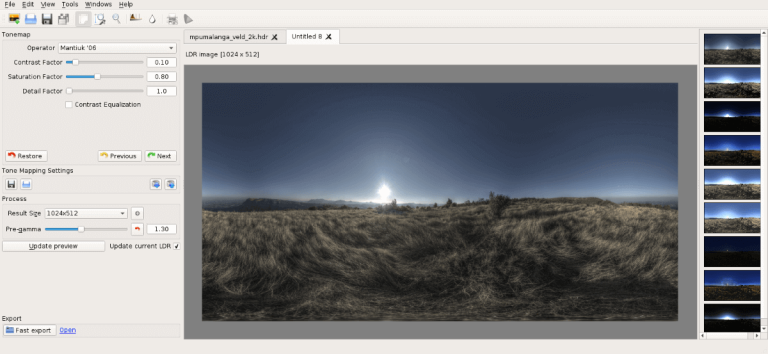
Luminance HDR’s strength is producing the full-dynamic-range master — the file everything else gets made from. The reliable path is:
Step 1 — Keep the full range in a master file
After merging, save the 32-bit result as OpenEXR (.exr) or 32-bit float TIFF before tone mapping. This preserves every stop your brackets captured. (AVIF isn’t on Luminance HDR’s export list — JPEG, PNG, TIFF, OpenEXR, and Radiance RGBE are — so the master-plus-conversion route below is the dependable one.)
Step 2 — Tone map a viewing copy, not the master
Apply your tone mapping operator to a copy for the SDR version everyone can open. Never bake the tone mapping into your only master — you can’t un-compress dynamic range later.
Step 3 — Convert the master to a delivery format
From the 32-bit master, encode an AVIF with PQ transfer using a dedicated encoder for HDR-capable web viewing, or keep a 16-bit TIFF for print and software pipelines. Match the format to the audience: AVIF for the web, TIFF for print, EXR for archival.
Viewing It on an HDR Display
A true HDR file only looks like HDR on a screen that can show it — roughly speaking, a display with real HDR brightness (look for DisplayHDR 600 or better) and 10-bit color. On an SDR screen, an HDR-encoded file will look wrong or get silently converted.
If you’re shopping for one, see our HDR monitor buying guide — and note that even the best display needs proper calibration before you trust what it shows.
Honest Limits
True HDR stills are early days for sharing. Most social platforms — Instagram, Facebook, X — convert uploads to SDR, so your carefully encoded AVIF arrives as a plain JPEG anyway. True HDR delivery currently makes sense for your own HDR display, client presentations on capable hardware, and archival masters. For everything else, a well-made tone-mapped SDR export (see our natural HDR settings) remains the practical choice.
Compare your overall options in our HDR software roundup, and download Luminance HDR to start from a genuine 32-bit master.
Frequently Asked Questions
Can I view HDR photos on my phone?
Recent flagship phones have HDR-capable displays and can show HDR-encoded images (typically AVIF or HEIC with HDR gain maps) in supporting apps. But most social apps still flatten uploads to SDR, so the HDR version rarely survives sharing.
Is AVIF better than JPEG for HDR?
For HDR delivery, yes — AVIF supports 10-bit color and the PQ/HLG transfer curves that carry true HDR, at smaller file sizes than JPEG. JPEG is 8-bit SDR only and physically cannot store HDR, regardless of how the image was created.
Does Instagram support HDR photos?
Not meaningfully. Instagram converts uploads to SDR JPEGs, so any HDR encoding is discarded on upload. If your audience lives on social media, export a great tone-mapped SDR version instead of fighting the platform.
What bit depth do I need for true HDR?
At least 10 bits per channel to avoid banding in smooth gradients, stored with a PQ or HLG transfer curve. In practice: 10-bit AVIF or JPEG XL for delivery, 16-bit TIFF for masters, 32-bit float (OpenEXR) for archival scene data.
Can Luminance HDR export AVIF directly?
AVIF isn’t on Luminance HDR’s export list — its outputs are JPEG, PNG, TIFF (8/16/32-bit), OpenEXR, Radiance RGBE, and LogLuv TIFF. The dependable workflow is to export a 32-bit master (EXR or float TIFF) from Luminance HDR, then convert to AVIF with a dedicated encoder.
Luminance HDR is free and open source (GPLv2).