Empowering Photographers with Open Source Tools
We believe that creating stunning High Dynamic Range imagery shouldn’t require expensive monthly subscriptions.
Our Story
Luminance HDR Guide started with a simple frustration. Years ago, we downloaded Luminance HDR (formerly Qtpfsgui), excited to try free HDR photography. But when we opened the software, we were greeted by a confusing interface, technical jargon like “Mantiuk ’06,” and zero documentation.
The software was powerful, but the learning curve was a vertical wall.
We decided to change that. We spent hundreds of hours testing every operator, adjusting every slider, and crashing the software more times than we can count—so you don’t have to. Our mission is to translate complex technical settings into simple, step-by-step photography workflows.
What You Will Find Here
Safe Downloads
Direct links to stable versions for Windows, macOS, and Linux. No bloatware, no ads, just the software.
Visual Tutorials
From fixing ghosting to exporting for print, we cover the entire workflow with screenshots.
Deep Dives
We compare operators side-by-side to help you choose between realistic and dramatic styles.
Our Testing Lab and Benchmarking Methodology
We don’t publish generic software roundups or regurgitate marketing feature lists. Every software comparison, hardware recommendation, and tutorial published on Luminance HDR Guide is tested rigorously in our independent digital imaging laboratory.
📸 Standardized 9-Bracket RAW Stress Test
We capture high dynamic range scenes spanning 14+ stops of dynamic range (-4 EV to +4 EV) using full-frame sensors (Sony A7 IV, Canon EOS R5) and professional drones (DJI Air 3). These standardized RAW files are fed into every HDR engine to evaluate alignment precision, ghost removal capability, and shadow noise amplification.
🖥️ Hardware-Calibrated Wide-Gamut Display Environment
All tone-mapped outputs and 32-bit floating point EXR files are inspected on hardware-calibrated Adobe RGB and DCI-P3 professional monitors (BenQ PhotoVue and ASUS ProArt) calibrated with Datacolor Spyder and Calibrite colorimeters. This ensures our tone mapping evaluations detect color gamut clipping, hue shifts, and micro-contrast edge halos that standard consumer monitors fail to display.
⚡ Cross-Platform Performance Benchmarking
We test software stability and batch processing performance across Windows 11 x64, macOS Apple Silicon (M1–M4), and modern Linux distributions (Ubuntu, Fedora, Arch). We monitor CPU thread utilization, RAM consumption, and OpenMP multi-threading efficiency to provide realistic hardware expectations.
Meet Our Editorial Lead and Imaging Lab Staff
We believe credible technical guidance requires real human accountability, verified credentials, and reproducible lab experiments—not anonymous content generation.
 ✓ Verified Specialist
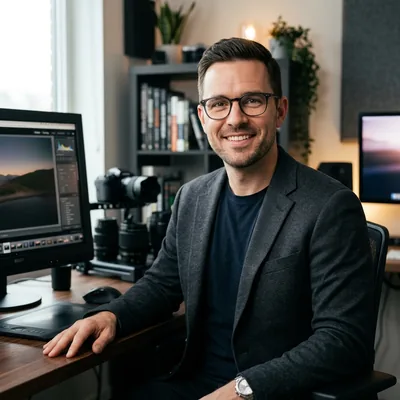
Oliver Vance
Lead Editor & Director of Digital ImagingOliver Vance is a professional landscape and architectural photographer with over 12 years of hands-on experience in 32-bit floating-point HDR imaging, RAW sensor demosaicing, and optical colorimetry. Holding a B.S. in Applied Imaging Science, Oliver has benchmarked open-source tone mapping algorithms since the earliest Qtpfsgui releases.
In the Luminance HDR Testing Lab, he directs all standardized 9-bracket exposure trials, spectrophotometer display calibrations (DCI-P3 & Adobe RGB), and cross-platform compilation benchmarks across Windows, macOS, and Linux.
Elena Rostova
Senior Colorist & Fine Art Print TechnicianFocuses on color space transformation, ICC profile generation, and 16-bit TIFF soft-proofing for cotton-rag archival prints. Expert in tone mapping gamut management.
Marcus Lindqvist
Open-Source Systems & Linux MaintainerMaintains our Linux benchmarking suite, testing multi-threading OpenMP efficiency, Homebrew scripts on Apple Silicon, and Flatpak builds on Ubuntu and Arch Linux.
Editorial Independence and Review Transparency
Luminance HDR Guide is 100% editorially independent. We do not accept sponsored software reviews, paid rating placements, or developer kickbacks. Free and open-source software is always evaluated on an equal, rigorous footing against multi-hundred-dollar commercial applications.
When we recommend hardware or commercial software alternatives, we provide honest pros and cons based directly on our hands-on test data.
⚠️ Transparency & Disclaimer
Luminance HDR Guide is an unofficial community resource. We are not affiliated, associated, authorized, endorsed by, or in any way officially connected with the Luminance HDR development team or SourceForge.
Luminance HDR is free software distributed under the GNU General Public License. All product names, logos, and brands are property of their respective owners. We maintain this site to support the open-source community.
Have questions or suggestions?
Whether you found a bug in our tutorial or want to share your own HDR photos, we’d love to hear from you.
Contact Us